


Types Of Filtering Concepts in Firewall Security

A firewall is a network security device or software that acts as a barrier between an internal network and external networks, such as the internet. It monitors and controls incoming and outgoing network traffic based on predetermined security rules. The primary purpose of a firewall security is to protect a network or computer system from unauthorized access and potential threats, such as malware, hackers, or malicious activities. Firewalls can be implemented in various forms, including hardware devices, software applications, or a combination of both. They analyze network traffic packets, inspecting the source and destination addresses, ports, protocols, and other attributes to determine whether to allow or block the traffic based on the configured rules. Firewalls can be configured to filter and block specific types of network traffic, such as certain ports or protocols, and can also provide additional security features such as intrusion detection and prevention, virtual private network (VPN) support, and logging capabilities to track and analyze network activity. By enforcing security policies and controlling network traffic, firewalls help to reduce the risk of unauthorized access, data breaches, and other cyber threats, thereby enhancing the overall security of a network or computer system. Packet filtering is a fundamental concept in firewall security. It involves examining individual network packets as they pass through a firewall and making access control decisions based on predetermined rules or policies. Here’s how packet filtering works: Packet Inspection: When a network packet arrives at the firewall, the firewall inspects the header information of the packet. This includes details such as source and destination IP addresses, port numbers, and protocol types (such as TCP or UDP). Rule Evaluation: The firewall compares the packet’s header information against a set of predefined rules or policies. These rules specify what types of traffic are allowed or blocked based on specific criteria. Access Control Decision: Based on the evaluation of the rules, the firewall makes an access control decision for the packet. The decision can be one of the following: Allow: If the packet matches an allowed rule, the firewall permits the packet to pass through and reach its destination. Block: If the packet matches a blocked rule, the firewall drops or rejects the packet, preventing it from reaching its intended destination. Default Behavior: If a packet does not match any of the defined rules, the firewall applies a default behavior. This can be either allowing or blocking the packet, depending on the firewall’s configuration. Commonly, firewalls are set to block packets that do not have a matching rule. Packet filtering can be based on various criteria, such as source and destination IP addresses, port numbers, and protocol types. For example, a firewall might have rules that allow incoming web traffic (HTTP) on port 80, but block incoming email traffic (SMTP) on port 25. Packet filtering is an effective mechanism for enforcing access control and filtering network traffic at the network layer (Layer 3) of the TCP/IP protocol stack. It helps protect against unauthorized access attempts, malicious traffic, and certain types of network-based attacks. However, it is important to properly configure and maintain packet filtering rules to avoid unintended security gaps or false positives/negatives. Apart from packet filtering, firewalls employ additional filtering mechanisms to enhance network security. Some of these mechanisms include: Proxy Filtering: Firewalls can act as proxies for specific protocols, such as HTTP or FTP. Instead of directly forwarding packets, the firewall establishes a connection with the remote server on behalf of the client. This allows the firewall to inspect and filter the content of the communication at the application layer. URL Filtering: Firewalls can implement URL filtering to control access to specific websites or categories of websites based on their URLs or domain names. This firewall security filtering mechanism helps enforce acceptable use policies, restrict access to malicious or inappropriate content, and prevent employees from visiting unauthorized websites. Content Filtering: Content filtering allows firewalls to inspect and analyze the actual content of network traffic, including web pages, email attachments, or file transfers. By using content filtering, firewalls can block or allow traffic based on predefined rules related to keywords, file types, or content categories. Malware Filtering: Firewalls can incorporate malware filtering capabilities to identify and block network traffic associated with known malware, viruses, or other malicious activities. This filtering mechanism helps protect against malware downloads or communication with malicious command-and-control servers. Deep Packet Inspection (DPI): Deep packet inspection goes beyond traditional packet filtering by examining the payload or contents of network packets at a granular level. It allows firewalls to inspect and analyze the complete packet, including the application-layer data, to detect specific patterns or behaviors associated with attacks or policy violations. Application Control: Firewalls can implement application control policies to regulate the use of specific applications or protocols. This mechanism allows organizations to enforce restrictions on applications that may pose security risks, consume excessive bandwidth, or violate compliance policies. Behavior-based Filtering: Some advanced firewalls incorporate behavior-based filtering, also known as anomaly detection. By monitoring network traffic and comparing it to normal patterns, these firewalls can identify and block suspicious or abnormal behavior that may indicate a potential attack or security breach. These additional filtering mechanisms provide firewall security with more granular control and visibility into network traffic, enabling them to enforce security policies at different layers of the network stack and mitigate various types of threats.
Firewall Misconfigurations: The Hidden Threat to Enterprise Security

Everyone knows that firewalls are the first line of defence in every modern business. They are like digital gatekeepers, keeping an eye on network traffic and keeping sensitive data safe from cyber threats. But what happens when the tool that is supposed to keep your business safe becomes a weak point? Hackers can get in through even a small mistake in your firewall settings, which can cause your system to go down and hurt your company’s reputation. We will also talk about how firewall misconfigurations happen, why they are bad, and what you can do to stop them in this blog. Read the blog ahead to learn more! Why Do Firewall Misconfigurations Matter? A Chief Information Security Officer (CISO) or IT leader is always thinking about how to protect the company. A firewall alone isn’t enough. How it is set up and kept up is what really matters. When you break a rule or forget to follow one, it can cause big problems with security and following the rules. Here are some ways that settings that aren’t set up right can hurt your business: • More Chances for Vulnerabilities and Data Breaches If you don’t set up your firewall correctly, it could create gaps in your defences. Cybercriminals can access your network via an open port or misconfigured rule. This could result in: • Unapproved access to private information• Data breaches and theft of intellectual property• Loss of money• Damage to your brand’s reputation that lasts for a long time A single small mistake in configuration can let attackers into your systems. • Stopped Business From Running Smoothly If you do not set up your firewall correctly, it might block real traffic or send it to the wrong place. This changes how your employees and customers use your systems. Outcomes:1. Less time spent working and more time spent resting2. Customers had bad experiences3. Services stopped, so money was lost In fast-paced fields, even a few minutes of downtime can hurt customer trust and business continuity. • Fines for Not Following the Rules and Regulations If your business works in a regulated field like finance, healthcare, or government, problems with your firewall can make it hard to follow the rules. If you share personal information or break privacy laws, you could be breaking rules like GDPR, HIPAA, or PCI-DSS. This can cause: • Legal problems• Loss of client trust• Damage to your reputation• Expensive fines and penalties To stay in compliance, you need to make sure that your firewalls are always set up, up to date, and being watched. • Slower Responses to Incidents and Investigations Your team needs accurate firewall settings and logs to find and stop a cyber threat when it happens. If a firewall isn’t set up correctly, it can make things much harder, slowing down response times and making the effects of an attack worse overall. When there isn’t clear and reliable data, investigations take longer and recovery is harder. During these times, losing time can make things worse and lead to longer downtime. How to Keep Firewall Settings from Going Wrong? A proactive approach is the first step in keeping your business safe. Instead of waiting for something to go wrong, set up a system that makes it less likely that things will be set up wrong in the first place. This is how to do it. • Do Regular Audits and Risk Assessments Make firewall audits a part of your regular cybersecurity routine. Regular checks can find old rules, extra permissions, and possible misconfigurations before they become security holes. Do these audits and detailed risk assessments to see how any mistake could hurt your business. This proactive approach helps fix problems before hackers can take advantage of them. • Make Firewall Policy Management Central Things don’t always work right when you have to manage more than one firewall by hand. A centralised management platform can do a lot. It shows you all of your organisation’s firewall rules in one place, which helps make sure that everything is correct and follows the rules. Automation tools can also help by:• Making sure that policies are always followed• Speeding up the process of updating and approving policies• Reducing the number of mistakes made by hand• Making sure that all systems follow the rules Centralised management saves time and keeps your security strong. • Use Tools for Continuous Monitoring and Detection You can’t just put up a firewall and forget about it. Tools that always watch things and intrusion detection systems can help you see suspicious activity as it happens. If your team has the right alerts set up, they can quickly find and fix problems before a breach or misconfiguration causes a lot of damage. • Teach and Train Your IT Staff One of the main reasons firewalls don’t work is that people make mistakes when they set them up. If you train your IT and security teams on a regular basis, they will always know about the newest best practices, technologies, and cyber threats. Not only does encouraging people to keep learning help them do their jobs better, but it also makes everyone in your company more aware of security issues. Making a Better Firewall Plan for the Future Even though it may seem like a small technical problem, a firewall that is not set up right can have big effects. The risks are too big to ignore, like losing money, having your system go down, or breaking the law. A firewall that is well-managed is more than just a tool; it is an important part of your plan to keep your computer safe. You can avoid expensive mistakes and keep your security strong by doing regular audits, managing everything from one place, keeping an eye on everything all the time, and training your teams well. Our main goal at Opinnate is to help businesses make their networks safer by managing firewalls in a way that is based on compliance, visibility, and automation. Take action today
Common Misconceptions or Myths About Network Firewalls
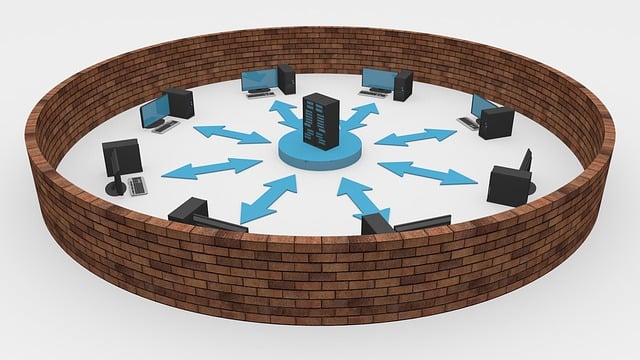
A network firewall is a security device or software that is designed to monitor and control incoming and outgoing network traffic based on predetermined security rules. It acts as a barrier between an internal network (such as a company’s private network) and external networks (such as the internet) to protect the internal network from unauthorized access, threats, and malicious activities. Network firewalls work by examining the data packets that flow through the network security and applying a set of predefined rules to determine whether to allow or block the traffic. These rules are typically based on criteria such as source and destination IP addresses, port numbers, protocols, and specific keywords or patterns in the packet content. The firewall can be configured to permit or deny traffic based on these criteria. By implementing a network firewall, organizations can establish a secure perimeter for their networks, control access to sensitive resources, prevent unauthorized access, detect and block malicious traffic, and enforce security policies. It is an essential component of network security infrastructure and plays a crucial role in safeguarding against various cyber threats. Firewalls play a crucial role in network security. It is the basic need to protect any network against security threats. However, there are a few common misconceptions or myths about network firewalls. Let’s explore some of them: It’s important to understand the capabilities and limitations of network firewalls and deploy them as part of a comprehensive security strategy. It should not be thought of a single technology that can do all cyber security protection by itself. Combining firewalls with other security measures ensures a more robust defense against a wide range of cyber threats.
How Do Firewalls Contribute To Network Security
Network security refers to the practice of implementing measures and safeguards to protect computer networks, systems, and data from unauthorized access, misuse, or attacks. It involves a combination of hardware, software, policies, and procedures designed to ensure the confidentiality, integrity, and availability of network resources. By implementing network security measures, organizations and individuals can mitigate the risks associated with unauthorized access, data breaches, and other malicious activities, ensuring the confidentiality, integrity, and availability of their networks and sensitive information. There are several technological components used for network security. Here are some of the key ones: These technological components work together to create layered defenses and establish a robust network security infrastructure. However, it’s important to note that effective network security requires a combination of technological solutions, policies, user awareness, and regular monitoring and maintenance. The basic and the most important of all these technologies is surely firewalls. Firewalls play a crucial role in network security by acting as a barrier between internal networks and external networks, such as the Internet. Here are some ways in which firewalls contribute to network security: Network Traffic Control: Firewalls monitor incoming and outgoing network traffic based on predefined security rules and policies. They examine packet headers and data to determine whether to allow or block traffic. By enforcing access control policies, firewalls prevent unauthorized access and limit the exposure of sensitive resources to potential threats. Access Restrictions: Firewalls allow network administrators to define access rules, specifying which types of traffic, protocols, or IP addresses are allowed or denied. This enables fine-grained control over network communication and helps protect against unauthorized access attempts or malicious activities. Intrusion Prevention: Some firewalls incorporate intrusion prevention capabilities. They analyze network traffic patterns and signatures to identify and block known threats or attack patterns in real-time. Intrusion prevention mechanisms can prevent malicious traffic from reaching internal systems and mitigate the risk of exploitation. Network Segmentation: Firewalls facilitate network segmentation by creating separate security zones within a network. By segmenting networks into different zones, such as DMZ (Demilitarized Zone) or internal LAN (Local Area Network), firewalls restrict the lateral movement of threats. This containment limits the impact of a potential breach and provides an additional layer of protection. Virtual Private Networks (VPNs): Firewalls often include VPN capabilities, allowing organizations to establish secure connections for remote users or branch offices. VPN functionality within firewalls ensures that data transmitted between remote locations and the internal network is encrypted and protected from interception or tampering. Application-Level Filtering: Some firewalls provide deep packet inspection capabilities, allowing them to analyze the content of network traffic beyond just the packet headers. This enables inspection and filtering of application-layer protocols, such as HTTP, FTP, or SMTP, to detect and block potential threats or policy violations. Logging and Monitoring: Firewalls typically log network traffic information, including connection attempts, blocked traffic, and security events. These logs can be used for monitoring, netwrok auditing, and incident response purposes, helping administrators analyze network activity, detect anomalies, and investigate potential security incidents. Distributed Denial of Service (DDoS) Protection: Advanced firewalls incorporate DDoS protection mechanisms to mitigate the impact of DDoS attacks. They can identify and filter out excessive or malicious traffic, ensuring that legitimate network services remain available during an attack. By implementing firewalls as part of a comprehensive network security strategy, organizations can establish a strong perimeter defense, control network traffic, protect against unauthorized access, and detect and prevent various types of threats and attacks.